
This section will show you how to configure OVERLAPS’ granular container permissions.
OVERLAPS uses an ACL-like permissions system where each user or group can be granted permissions to individual containers in your Active Directory structure.
The Permissions section is split vertically into two parts: A navigation tree for finding the container you want to edit, and a list of the Users/Groups who have permission to the currently selected container.
It is important to note that any changes made here are set in OVERLAPS only. No changes are made to your Active Directory structure or permissions.
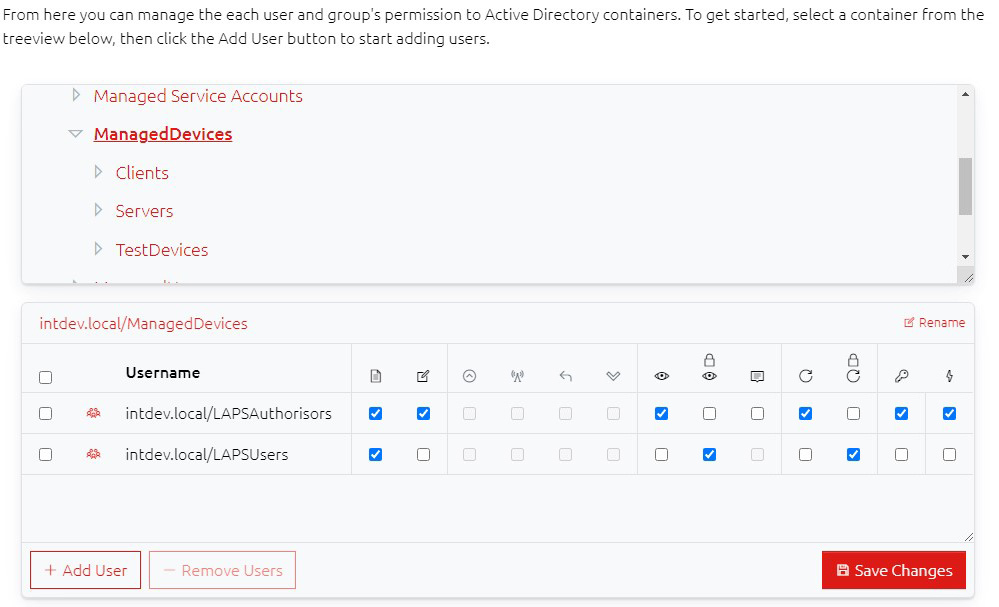
With a valid container selected, you can add or remove users using the relevant buttons, and change their permissions (see below) accordingly, but the permissions are only saved when you click the Save Changes button.