
Use the breadcrumb links to jump to any container immediately above the current one.
Alternatively, click the last item (the current container) to show a dropdown of the child containers under this one, allowing you to quickly navigate further down the tree (as shown below).
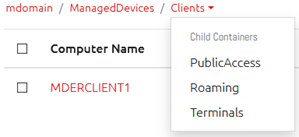
Note that if the current user does not have permission to any of these containers, one of two differences will show depending on your settings. For more information on this, see Config -> Settings -> Security -> Organizational Unit Visibility.
If you have unchecked the option to “Hide links to containers when a user does not have permission to it” then these containers simply will not show in the breadcrumbs.
If, however, you have this option checked, then the containers w