
Welcome to the official documentation for OVERLAPS for Windows LAPS.
Introducing Windows LAPS
Windows Local Administrator Password Solution (LAPS) is a free tool for securing the Windows computers in your Active Directory environment.
By performing scheduled resets on the Local Administrator account passwords on your domain-joined computers, LAPS helps to mitigate the threat of “Pass-the-Hash” type attacks against your network. It generates new passwords completely randomly, bypassing the need for shared or formulaic passwords, and stores them securely in either your on-site Active Directory or Microsoft Entra (Azure Active Directory) for the use of your Service Desk teams.
Its benefits include:
- Protection against pass-the-hash and lateral-traversal attacks
- Improved security for remote help desk scenarios
- Ability to sign-in to and recover devices that are otherwise inaccessible
- A fine-grained security model (access control lists and optional password encryption) for securing passwords that are stored in Windows Server Active Directory
- Support for the Azure role-based access control model for securing passwords that are stored in Microsoft Entra (Azure AD)
Microsoft LAPS vs Windows LAPS
Microsoft LAPS refers to the legacy version of the Local Administrator Password Solution, which was the version that had to be installed manually on your client devices.
Windows LAPS is the new client released by Microsoft to replace the legacy version, and has been deployed by default to all Windows 10 and 11 (Pro, Enterprise and EDU edition) devices with the Cumulative Update for April 2023.
This new client offers additional benefits over the legacy version, including Encryption when storing the passwords in Active Directory, and a password history for retrieving previous passwords (for situations such as using System Restore to recover a device back to a time before the last password reset).
How does LAPS work?
LAPS is a Client Side Extension (CSE) to Group Policy released for free by Microsoft. It creates new protected attributes in your Active Directory schema for computer objects which are used to store the computer’s Local Admin password and expiry information. On devices on which it is enabled, it works by:
- LAPS retrieves the current expiry date and time for the Local Administrator password on the current computer from Active Directory.
- If the expiry is not blank and is still in the future, nothing happens.
- Otherwise a new password is required, so LAPS generates one completely randomly according to your specifications (set in Group Policy).
- LAPS then attempts to record the new password in Active Directory, along with when the password will next expire.
- If that was successful, it will only then actually change the password of the Local Administrator account.
What is a Pass-the-Hash attack?
Windows accounts are stored hashed (one-way encrypted) and are, in principal, accessible to anyone with access to that computer. A pass-the-hash attack uses this hash in place of the actual password to access resources on other computers on your network with the same account/password.
LAPS mitigates the threat of pass-the-hash attacks by ensuring each computer has a different password (and therefore a different hash) for their Local Administrator account.
What does LAPS cost?
Windows LAPS, which replaces the legacy client, was released as part of the April 2023 Cumulative Update for free, and will likely already be installed on your Windows 10 and 11 devices (Pro, Enterprise and EDU editions only).
What management tools come with LAPS?
LAPS is packaged with a PowerShell module for retrieving and manually expiring passwords.
Further Reading
For information about Windows LAPS, you can read more here:
What is OVERLAPS?
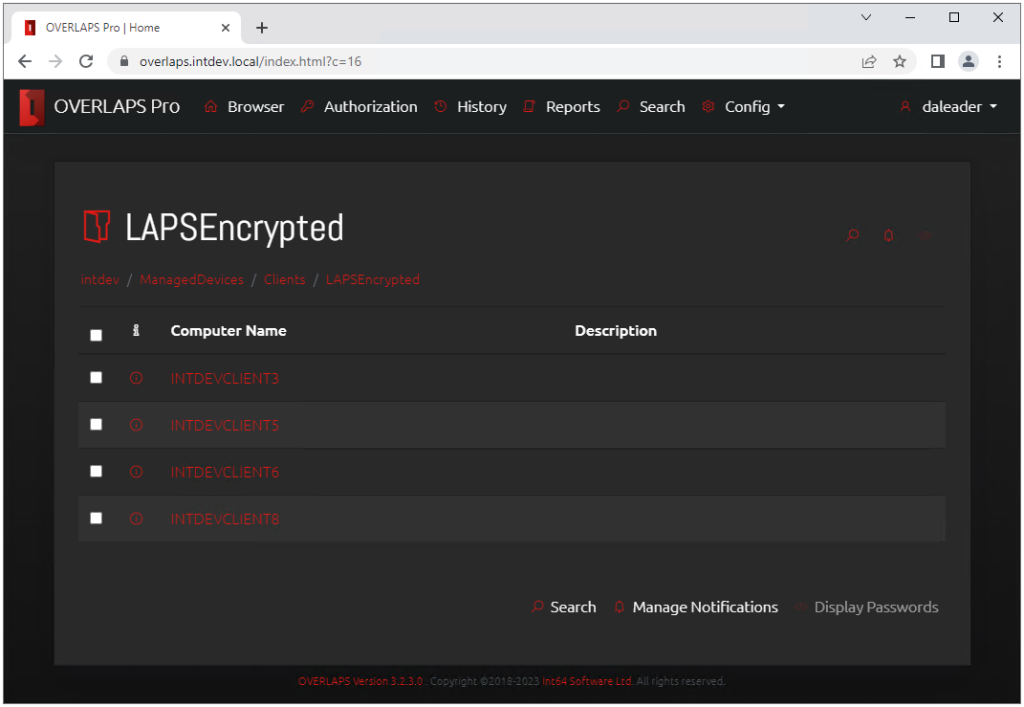
OVERLAPS provides and alternative, self-hosted user interface for retrieving and expiring LAPS managed passwords through any modern browser on any network attached device. More than this, it removes the hassle of managing and maintaining Active Directory permissions for LAPS attributes by allowing you to specify which users or groups have access on a per-OU basis.
It provides:
- Access to LAPS passwords whether they are set by the Legacy LAPS client or the new Windows LAPS update, whether they are encrypted or not.
- The ability to expire passwords so that the client device resets it, which can be done immediately or at some specific point in the future.
- Its own built-in configurable Password History.
- Full granular permissions, offering more control over your environment than AD permissions alone can provide.
- Self-Service access for assigning specific computers to individual users, instead of having to provide full OU access.
- A full Request Authorisation system, allowing you provide access to LAPS passwords to your users while requiring them to submit an access request each time they do, which then can be manually authorised or denied.
- A notification system so that you can monitor who is accessing what.
- A full History which can be used for auditing purposes.
- And more…
1.2.1 How does OVERLAPS work?
- You install it on a computer or server which will act as the web server for OVERLAPS.
- Configure your Active Directory permissions to allow that computer the appropriate access to the LAPS password and expiry attributes.
- Setup SSL/TLS encryption to make sure everything is secure.
- Add users and/or groups, and specify what Organizational Units or containers that they are allows to access.
- Users can now login to OVERLAPS and access the LAPS managed passwords as needed.
System Requirements
Server Requirements
- Windows 8.1 Pro or higher, Windows Server 2012 R2 or higher.
- .NET Framework 4.8
By default OVERLAPS runs as the system account on the server (NT AUTHORITY\SYSTEM), and permission must be given to this account to read and write the LAPS properties (see Active Directory Permissions for OVERLAPS). Alternatively, if you are planning to use a Service Account to allow OVERLAPS to access Active Directory then that account must have the relevant LAPS permissions.
Client Requirements
Any modern internet browser with Javascript enabled.